Touch and Light
Apply stimuli, measure responses — and learn to tell a real reaction from a loose contact.
In a nutshell
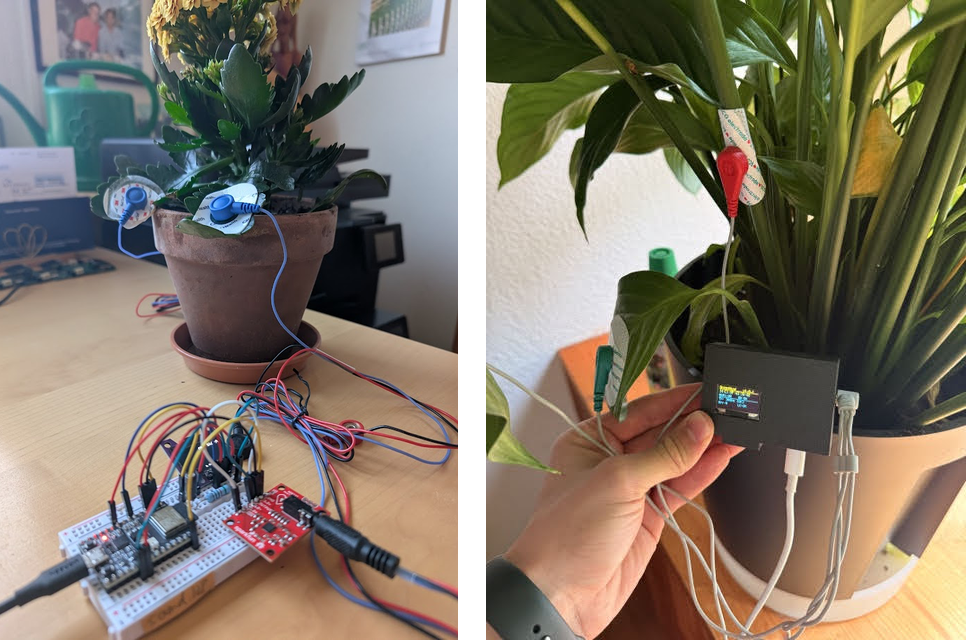
What: You use the plant sensor you built in Activity 11.1 and give the plant deliberate stimuli — a gentle touch, a change of light. You record the voltage trace with a timestamp and check, with a control, whether the curve really responds to the stimulus.
You need: the finished sensor, a laptop, a sturdy houseplant and a desk lamp. No new component, just an extended sketch.
What it's about
In Activity 11.1 you saw that a tiny, slow voltage runs through a living plant. Now you ask the decisive question: does the plant respond to its environment? Touch a leaf, and in many plants an electrical wave runs through it — botanists call it an action potential or, when there is injury, a variation potential. It is the same mechanism a mimosa uses to fold its leaves together, only that here we see it directly as a voltage.
Plants react to light in just the same way: when it suddenly goes dark, the ion currents in the leaf cells shift and the baseline of your curve makes a small jump. This is not magic but physiology. The exciting part — and the thread of this book — is the second question: how do you know the curve is responding to the stimulus and not to you?
Before you start
The sensor from Activity 11.1 must be running: a calm line on the OLED, no wild jitter. If it isn't running cleanly yet, go back there first — otherwise you only measure noise here. After sticking on the electrode, let the plant settle for two to three minutes before you apply the first stimulus.
A little background
Why "slow" matters here. A human nerve impulse lasts milliseconds. A plant excitation wave is a thousand times more sluggish: it creeps through the tissue over seconds to minutes. That is exactly why you can see it at all with a cheap sensor — and exactly why you must be patient. After a touch the response often comes only one or two seconds later and dies away again over ten to thirty seconds.
Why a control is indispensable. When you touch a leaf, the cable moves, you introduce the static charge of your hand, perhaps the gel pad shifts minutely. Each of these effects makes a deflection — without the plant "feeling" anything at all. A finding arises only when the deflection appears on the living leaf but not in the control. That is the heart of scientific work: not the wonder, but the ruling-out.
Preparing
- Extend the sketch. Flash the extended sketch from the appendix onto the
ESP32. It does the same as before, but additionally marks: as soon as you press the BOOT button, it
writes an
EVENTto the Serial Monitor. That gives you an exact timestamp in the data stream for "now I applied the stimulus". - Open the Serial Plotter. Tools ▸ Serial Plotter, 115200 baud. Here you see the curve large and can read deflections precisely. For the later analysis, open the Serial Monitor in parallel and copy the numbers out.
- Wait for the resting line. Let the plant rest for two minutes. Note how much the line drifts on its own — that is your background noise. Only what is clearly larger counts later as a reaction.
Experiment A — Touch
- Apply the stimulus. Gently touch a leaf other than the one with the electrode, with a finger or a cotton bud. At the same moment press the BOOT button (timestamp).
- Wait and watch. Watch the curve for the next 30 seconds. Does a deflection come? When — immediately or delayed? How long does it last?
- Repeat. Wait a minute (the plant "recovers"), then touch again. Do this five times. A single reaction is chance, five similar ones are a pattern.
- Control. Now the most important step: make the same movement next to the plant, in the air, without touching a leaf — press BOOT, wait. If the same thing happens, it was you. If nothing happens, that argues for a real plant reaction.
Experiment B — Light
- Darken. With the line calm, switch off the room light and the lamp (press BOOT). Wait 60 seconds. Many plants show a slow drift of the baseline at the light→dark transition.
- Brighten. Switch the light back on (press BOOT), wait again. The dark→light transition is often more pronounced than the reverse.
- Control. Briefly hold your hand over the electrode without changing the light — only shadow, no real stimulus for the whole plant. Does that change the curve? If so, you may be measuring warmth or movement instead of light.
Tip: log it cleanly
Note three things for each stimulus: time/second, kind of stimulus and deflection yes/no/how strong. Without a log, five trials blur afterwards into "it reacted somehow". With a log it becomes a result you can argue about — and that is exactly what science is.
Worksheet
Analysing your measurement series
- How large was your background noise at rest (roughly the range within which the line drifts with no stimulus)? Why must you know this value before you speak of a "reaction"?
- On how many of the five touches did a clear deflection come? And on how many of the five air controls? Enter both numbers.
- Was there a difference in the light experiment between light→dark and dark→light? Describe it.
- Suppose the group next to you measures the same thing and gets no deflection on touch. Name two possible reasons that have nothing to do with "their plant feels nothing".
- Put in one sentence what you were able to show today — and what you were not able to show.
Show solution
1. Typically the line drifts at rest within a small range (e.g. ± a few per cent of the scale). You must know it because a "deflection" smaller than the background noise is not a signal but chance. Reaction = clearly larger than the noise.
2. Expected: several clear deflections on a real touch, few or none on the air control. Exactly this difference is the proof. If a deflection comes on the control too, you are measuring movement/static, not the plant.
3. Often the dark→light transition is the stronger stimulus (the photosynthesis system "switches on"). More important than the sign is that any reproducible difference from the resting line is discernible at all.
4. For example: poor electrode contact (dry gel pad), a different plant species with a weaker reaction, too short a recovery pause between stimuli, or an already "stressed" plant. The result depends on the setup, not only on the plant.
5. Usually you can show: "On touch/light change the measured voltage changes reproducibly, in the control it does not." What you cannot show is: "the plant feels pain" or "perceives me" — that would be an interpretation, not a measurement.
When it sticks
| Problem | Likely cause & fix |
|---|---|
| Every stimulus gives a huge deflection, the control too | You are moving the cable or introducing static. Fix the cable (tape), discharge on a radiator beforehand, apply the stimulus with an insulated stick instead of a finger. |
| No reaction at all, even to a firm touch | Electrode contact or plant. Renew the gel pad, clean the leaf, take a more good-natured plant (Kalanchoe, mimosa). Allow enough recovery time. |
| Curve slowly drifts in one direction | Usually normal "settling" of the contact. Wait longer before the experiment, until the baseline is calm. |
| EVENT mark missing in the monitor | Not the right button — press the BOOT button (not EN/Reset). Set the baud rate in the monitor to 115200. |
Food for thought
- A real reaction should have three properties: it comes after the stimulus, it is larger than the noise, and it is reproducible. If one of these is missing, you have no finding — only a guess.
- Why do we touch a different leaf from the one with the electrode? Because otherwise we couldn't tell whether we're measuring the plant's excitation wave or simply the pressure on the gel pad. Separating the site of the stimulus from the site of the measurement is a small but decisive trick.
- The same logic sits behind the Biolingo/GreenMind platform: a deflection alone means nothing. Only the comparison with a control and the repetition across many plants turns raw data into a robust statement.
Extension
- Measure the response time: note for each touch the seconds between EVENT and deflection. Is the delay constant? Does it get shorter when you touch more firmly?
- Habituation: touch the same leaf ten times in quick succession. Does the response get weaker each time? Plants can "get used to" harmless stimuli — a simple form of learning without nerves.
- Species comparison: repeat Experiment A on Kalanchoe, mimosa and Tradescantia. Which reacts most clearly? Record how you measure "clearly" — otherwise you are comparing gut feelings.
Appendix: the extended sketch
As in 11.1, but with an event mark on the BOOT button (GPIO0). The tested version is also on github.com/pgloor/verborgene-signale-code.
/*  Plant sensor + stimulus mark  -  Hidden Signals, Activity 11.2
    Like 11.1, but: the BOOT button (GPIO0) writes "EVENT" with a timestamp.
    Board: DOIT ESP32 DEVKIT V1   Libraries: Adafruit SSD1306 + GFX  */
#include <Wire.h>
#include <Adafruit_GFX.h>
#include <Adafruit_SSD1306.h>

const int WIDTH = 128, HEIGHT = 64;
const int OLED_ADDRESS = 0x3C;
const int SIGNAL_PIN = 34;
const int BOOT_PIN   = 0;      // BOOT button for marking
Adafruit_SSD1306 display(WIDTH, HEIGHT, &Wire, -1);
int curve[WIDTH];
bool last = HIGH;

void setup() {
  Serial.begin(115200);
  pinMode(BOOT_PIN, INPUT_PULLUP);
  Wire.begin(21, 22);
  display.begin(SSD1306_SWITCHCAPVCC, OLED_ADDRESS);
  analogReadResolution(12);
  for (int i = 0; i < WIDTH; i++) curve[i] = HEIGHT / 2;
}

void loop() {
  int value = analogRead(SIGNAL_PIN);
  Serial.println(value);                // measurement for plotter/monitor

  bool now = digitalRead(BOOT_PIN);     // button pressed = LOW
  if (last == HIGH && now == LOW) {
    Serial.print("EVENT at ms=");
    Serial.println(millis());           // timestamp of the stimulus
  }
  last = now;

  for (int i = 0; i < WIDTH - 1; i++) curve[i] = curve[i + 1];
  curve[WIDTH - 1] = map(value, 0, 4095, HEIGHT - 1, 0);
  display.clearDisplay();
  display.setCursor(0, 0); display.print("Touch / Light");
  for (int i = 0; i < WIDTH - 1; i++)
    display.drawLine(i, curve[i], i + 1, curve[i + 1], SSD1306_WHITE);
  display.display();
  delay(20);
}